
PUBG Name Generator with Stylish Symbols 😎🔥(Copy/Paste)
PUBG Name Generator v3 
ʏᴏᴜʀ㊌ɴᴀᴍᴇ㊌ʜᴇʀᴇ
ʏͥᴏᴜʀ ɴᴀᴍᴇ ʜᴇʀͣᴇͫ
Yᴏᴜʀ᭄Nᴀᴍᴇ ʜᴇʀᴇᴮᴼˢˢ
ⁱᵃᵐʏᴏᴜʀ ɴᴀᴍᴇ ʜᴇʀᴇᴮᴼˢˢ
༄ᵘˢᵃ᭄✿ʏᴏᴜʀ ɴᴀᴍᴇ ʜᴇʀᴇ࿐
༺ʏͥᴏᴜʀ ɴᴀᴍᴇ ʜᴇʀͣᴇͫ༻ᴮᴼˢˢ
〘Ƴöυɹ ɴaмε Ⱨεɹε〙
ᯌ ㄚσuʀ N₳ṁé Ⱨéʀé ᯌ
I乛AM ɎØúʀ炎Nαmє炎Hєʀє
ᯌ ㄚøúʀツͶämεツĦεʀε
Ɏoὗŕ丶Nαɱє丶Hєŕє ✓
Y⊘υя 几ᴀṁє Ħєяє ᯎ
Ƴσuʀ二Иaᴍἔ二Ħἔʀἔ
¬_¬ ㄚoᵾяヤ₦αмᴇヤĦᴇяᴇ
巠 Yőuʁ〩Ͷáṁε〩Hεʁε
ɎoɄя Ṉαмë Ħëяë ᯒ
ƳøυⱤ乛Ṅɐmë乛HëⱤë ϟ
廵 ɎØüŕ ɴᾄᴍᴇ Ħᴇŕᴇ
lเttlє Ƴoυяᯎɴɑḿëᯎ卄ëяë
Youя Ɲαmε Hεяε
丶 Ÿoúɍ Nαmé Héɍé
ᯓ ⅄oüɾ一Ͷᾄmë一Ħëɾë
¥ouя Ńɐmε 卄εяε ϟ
兰 Yσᴜŕ亘NȺmé亘卄éŕé 兰
꧁༺⅄oᵾʀ炎ͶɑɱɆ炎卄ɆʀɆ༻꧂
彡 Ƴơυʀ 几ᴀḿε ʜεʀε
✨ Ɏσὗɹ Nᴀмe Heɹe
Ɏöuṛ ɴᴀmє Hєṛє
Ɏσüɍ᭄Ɲαᴍε᭄Hεɍε
》• Yöᵾɾ Ṉamǝ Hǝɾǝ •《
Ɏơᴜʀ٪Ͷᾄɱє٪Hєʀє ፦
多 Ɏσᴜṛ Nαṁᴇ Hᴇṛᴇ
◥꧁Ƴ⊘υṛ NȺмє Ħєṛє꧂◤
ᯎ Youя仌几ᴀᴍǝ仌ʜǝяǝ
巛 ㄚσuяᯏŃαmεᯏ卄εяε
꧁༺ㄚøɄⱤ Nαmǝ ĦǝⱤǝ༻꧂
廵 ʏσuʁ Ɲαmᴇ Hᴇʁᴇ
Youя ɴáмᴇ Ħᴇяᴇ ᯎ
ㄚσυɾ乛Ɲαmε乛Ħεɾε
¥őὗŕ↔Náṁɇ↔Hɇŕɇ ¬_¬
Ƴøυя〩Nɑḿǝ〩Ħǝяǝ ✓
ᵒᵖɎoυṛ全Ɲαṁǝ全Hǝṛǝ
>ܫ< YØɄŕ共Ṉäмє共Hєŕє
父 ƳὄɄяヤƝᾄɱєヤHєяє
ᵐʳʏ⊘üṛ Nᾄmє Hєṛє
ƳoɄṛ Ńɐмǝ Hǝṛǝ
ᯄ Ƴơüɍ ͶȺmє Hєɍє
→ Ɏ⊘ᴜя亖₦Ⱥmɇ亖卄ɇяɇ
佥 Ɏőuʁ会NäṁɆ会HɆʁɆ
Ƴőúʀ Ɲαṁἔ 卄ἔʀἔ 头
「OP」YơüⱤ ɴäмє HєⱤє
彡 ⅄ØúяϟN₳₥ëϟHëяë
ᵒᵖYőᴜʁ全Ṅɑмε全Hεʁε
༄ ʏøυɹ Nαмε Hεɹε
Ƴoᴜŕ ƝȺṁɆ HɆŕɆ
¬_¬ Ÿøᴜя全Na₥ε全ʜεяε
仝 Ɏoὗʀ㊌Ń₳mє㊌Hєʀє 仝
个 Yoᵾɹ ₦α₥ἔ ʜἔɹἔ
ʘ͜ʖʘ ¥ơɄя亖ͶȺḿɇ亖Ħɇяɇ
ツ ¥őúя Ɲäмἔ Ħἔяἔ
ツ ʏőὗʁ Ṅαmε Hεʁε ツ
ɎoɄṛ Nαmǝ Ⱨǝṛǝ Ƥlคץร
✨ YØúʀ Ṉ₳mє Hєʀє
꧁༒Ÿơüṛ ₦₳ɱé 卄éṛé༒꧂
ツ ㄚoɄя⦆⦅Namë⦆⦅Hëяë
↑ Ƴöυя Ɲαmɇ Hɇяɇ
ᵒᵖɎoὗṛ々Ṉαᴍἔ々卄ἔṛἔ
丶 Ɏøᴜя ɴᴀмᴇ Hᴇяᴇ
ᴮᴬᴰYoúɍ乛Ɲαṁǝ乛Hǝɍǝ
彡 YØur炎Nᴀɱє炎Hєrє
╰‿╯ YσɄʀṄáмǝⱧǝʀǝ
ツ ⅄σὗⱤ Naмǝ ʜǝⱤǝ
YőᴜⱤᯖƝäṁᴇᯖⱧᴇⱤᴇ ᯌ
ᵐʳƳơὗṛ 几ᾄḿε Ħεṛε
ϟ ʏ⊘ὗʁ Ṅ₳më Hëʁë ϟ
ϟ ¥øυŕ一ИȺᴍǝ一Hǝŕǝ ϟ
ᶜʳᵃᶻʸɎὄɄя Иαмε ʜεяε
多 Youя ͶȺмε Ħεяε
ʏὄὗʁ ƝɐmɆ ⱧɆʁɆᶠᶠ
↑ Ÿ⊘υr NáᴍɆ HɆrɆ
✿ ʏơᴜɍ乛ƝαmɆ乛卄ɆɍɆ ✿
佥 ㄚoυя∽Ńɐmε∽Hεяε
Yőuʀ Ṅαмε Hεʀε ¬_¬
Ƴouя Nɑmє Ⱨєяє
⅄ơúя ƝáмɆ HɆяɆ ¬_¬
✨ Ɏσur仌₦αmє仌ʜєrє
YØὗяᯖNäмєᯖĦєяє
༄ Yoὗɾ乛Ɲá₥ε乛Hεɾε ࿐
Yσυɍ 几ᾄḿє 卄єɍєᴼᴾ
× ʏ⊘υɹ Ɲαmᴇ Ⱨᴇɹᴇ
¬_¬ ⅄ὄuя Ṅɐмє ʜєяє
ᯃ Ƴoυʀ ṈȺmé Héʀé
ɎoɄяᯙṈαmεᯙĦεяε ࿐
✿ YᴏúяシNᾄмєシHєяє ✿
→ YØüя㊌Náḿé㊌Héяé
⦅ ㄚơúⱤ Ɲαṁε HεⱤε ⦆
ᯌ Yσúʁ二Ͷ₳₥ë二Hëʁë
ツ ⅄ØuʁノƝɑmεノHεʁε
巛 ⅄ὄυя Ɲαɱᴇ Hᴇяᴇ
ʏσur•Ṉαṁᴇ•Hᴇrᴇ
→ ¥ouя Ńαḿє Ħєяє
⦆ʏøúʁ Nämǝ Ħǝʁǝ⦅
Ɏσᵾr Ɲäмε Hεrεᶠᶠ
丶 ¥ơὗя Naṁἔ Hἔяἔ
¥ơυʀ Ɲɑмє Ⱨєʀє
巠 ⅄⊘úɹ∽NȺmɆ∽ⱧɆɹɆ
丶 ⅄Øὗʁ Ṅɑмë Ħëʁë
ᯐ Ƴöυʁ ƝȺᴍє Hєʁє
Ƴöᵾʁ٪几αmë٪Ħëʁë⁴²⁰
♥‿♥ Ÿoúʀ亚Ɲɐɱε亚卄εʀε
亞 ㄚ⊘uɍ兰Ṅämἔ兰ʜἔɍἔ 亞
Yoᴜя Ͷámε Hεяε ࿐
佥 ɎσɄɾ ₦ᾄмᴇ Ħᴇɾᴇ
ᯃ Yøυя Ṉäḿє ʜєяє
ƳσυʀܫƝᾄмëܫⱧëʀëʸᵀ
ɎØɄɾ二Nαmε二Hεɾε ✓
Ƴσuʀ ɴαɱε Hεʀε
ᵒᵖɎoɄɹ Ͷᴀмἔ 卄ἔɹἔ
ᵒᵖ¥oɄɹ ƝȺмë Hëɹë
Yσuɹ᭄ŃαmɆ᭄HɆɹɆᴮᵒˢˢ
彡 YσuяシɴɐmєシHєяє
ʏσúṛ Ɲᴀмǝ Hǝṛǝ ᯎ
Yöuя Ɲαмë Ħëяë ፦
廵 Ɏoúʀ Nαмє Hєʀє
ᯕ Ɏőur丶Ńαḿε丶Hεrε
Ÿ⊘üя Ńᾄɱë Hëяë
米 Yöuʀ丫ɴαmε丫Hεʀε
Ɏ⊘ᵾʀ Nɐmє Hєʀє ❹❷⓿
ƳσɄṛ兰ṄɑmɆ兰ʜɆṛɆᵒᵖ
个 ㄚᴏὗŕ✿ṈáмɆ✿HɆŕɆ
「Yσuʀ᭄Ͷαṁɇ᭄Ħɇʀɇ」
ϟ Yᴏᵾʀ兲Nαḿé兲Ħéʀé
Ƴöυя ɴȺmǝ Ħǝяǝᶠᶠ
Ɏouɾ᭄Ɲᴀmἔ᭄Hἔɾἔʸᵀ
↑ ƳσᵾʀᯖИa₥éᯖHéʀé
↑ Ƴσuʀ炎Ṉαмᴇ炎Ⱨᴇʀᴇ
I乛AM ㄚØᴜⱤ Nαṁë HëⱤë
I乛AM Ɏöúʁ Ɲᴀ₥ë Hëʁë
》 ʏőὗя Náɱǝ ʜǝяǝ 《
YσɄŕ々Naḿἔ々ʜἔŕἔ ᯒ
ヅ Youɾ Ɲᾄɱє Ħєɾє
◣‸◢ Ÿ⊘υɾ NaɱɆ ĦɆɾɆ
Ɏoᵾɾ༒Ńαᴍé༒Héɾé
冫Ɏoυŕ Ṉ₳мє Ⱨєŕє
ŸơɄŕノṈαmєノĦєŕє
ɎσɄɍ二Namє二Ħєɍє Ƥlคץร
↑ Ÿ⊘Ʉɹ ₦αmǝ Hǝɹǝ
ʘ͜ʖʘ YouʁᯌŃαḿëᯌʜëʁë
丶 Yöüʀ Nαme Ħeʀe
彡 ㄚoúя N₳më Hëяë
Ɏᴏᴜṛ ṄȺᴍë ʜëṛë ¬_¬
个 Ɏσᴜɍ Ɲαmє Hєɍє
ᶦᶰᵈシƳ⊘ᵾʀ✨Ͷᴀmǝ✨Hǝʀǝ
๏̯͡๏ ɎᴏɄⱤ艾ƝᴀmɆ艾HɆⱤɆ
卍 YoɄя ɴᾄmǝ Ħǝяǝ 卍
巜 Ƴᴏuŕ 几αмë Hëŕë
ᯃ Yơüʀ Ɲαṁǝ 卄ǝʀǝ
Ɏőυʀ Ɲα₥é Ⱨéʀé ϟ
Ɏσúṛ六Ɲαmε六Hεṛε ↑
ʏὄüⱤ∽Иαмє∽HєⱤє ᯒ
Yøυʀ Ńᴀмɇ Ⱨɇʀɇᴮᵒˢˢ
ʘ͜ʖʘ ƳøuɹᯌNámєᯌHєɹє
Ƴoᴜя关NȺмë关Hëяë
ᯒ ɎőúⱤ Nαмє HєⱤє
ᶦᶰᵈシYσᴜя٪ɴáмє٪Hєяє
ŸøυⱤ兰Ͷαṁɇ兰HɇⱤɇ
꧁Yoᴜʀ᭄Ṅäмε᭄Hεʀε꧂
♥‿♥ Yσuɾ Ͷáмε Hεɾε
≪ Ɏơᵾʁ Ɲαᴍε Ⱨεʁε ≫
亗 ƳᴏuⱤ⦆⦅Nαмἔ⦆⦅HἔⱤἔ 亗
ʏσɄя兰Ṅᴀḿε兰Hεяεᶠᶠ
ɎØυɍ Namë 卄ëɍë
>ܫ< Ɏoυʁ兴ɴɐмǝ兴卄ǝʁǝ
¬_¬ YᴏɄʁ Ɲɑmє 卄єʁє
Ɏoυr Ṅᾄᴍë Hërë
Ÿᴏuя Ɲämǝ ʜǝяǝ 头
Youɾ༒Nämε༒Ħεɾεʸᵗ
巛 ɎőυⱤ二ṄɐмɆ二HɆⱤɆ
个 Ƴöúɍ Ɲämɇ Ⱨɇɍɇ
¥ØúⱤ亚NaṁɆ亚HɆⱤɆ⁴²⁰
YoυⱤƝamεⱧεⱤεᶠᶠ
Yoᴜɾ Ṉαmє ʜєɾє
๏̯͡๏ ɎøúɾϟNɑmєϟHєɾє
ᴵᴬᴹɎoüяツ₦αмëツĦëяë
ƳσɄʁ亠₦Ⱥмε亠Hεʁε
◣‸◢ Ɏσυʀ ƝȺmɇ Hɇʀɇ
ᯌ ɎơúŕᯈƝɐмєᯈHєŕє
≪ ¥oɄя•Nämé•Héяé ≫
→ Yσúя᭄Ṅᾄᴍɇ᭄Hɇяɇ
彡 ¥øúя仒Иaᴍë仒Hëяë
ㄚoúʁ 几ɑṁє Ħєʁє
ㄚoυʀ仒Ńαmé仒ʜéʀé
ᯏ Ɏσuʀ Ńaḿé Héʀé
多 ⅄⊘uʀ亠Nɑṁε亠卄εʀε
ᯕ ŸøɄɾ Иáᴍἔ Ħἔɾἔ
¥ouя⦆⦅NȺмǝ⦆⦅Hǝяǝᶠᶠ
Ɏσυʀ ИαmɆ HɆʀɆ₄₂₀
Ƴouɾ Nᴀмє Ħєɾє ᯒ
ᴵᴬᴹƳØüʀ Nαmἔ Hἔʀἔ
ᶦᶰᵈシ¥oᴜʀ亚Nɐmє亚Hєʀє
❖ Yσὗʀ亘Ńαmë亘Hëʀë ❖
We have tried to include our top favorite names here, but this list is not complete by any means. For more, take a look at our complete list of best nicknames for PUBG, and for a complete list of all compatible stylish symbols for PUBG, see PUBG Symbols
How to use v1 of this tool
Ready to transform your plain gamertag into something legendary? It’s incredibly simple to get started.
Start by typing your desired nickname into the “Enter your name here” input field. Once you are set, hit the “Generate” button.
Like magic, the tool will instantly create hundreds of fancy, stylish variations perfect for PUBG.
Want to see more options? Just click the “Next” button to cycle through endless possibilities until you find the perfect match.
Found the one? Click the “Copy” button to instantly save your new stylish name to your clipboard.
- Enter your name in the box that says “Enter your name here”.
- Click on Generate button
- Click on Copy button if you like the name, else click on Try Again.
How to use v2 of this tool
Want even more control over your look? Version 2 puts you in the driver’s seat, allowing you to manually craft your name with specific symbols.
Here is how to craft your masterpiece:
- Enter your name in the Name field.
- Click on any symbol to enter in the name field.
- Click on the left and right drop-down to choose prefix or suffix symbol.
- Click on Generate button to see your name in different Styles 🙂
Changing your name in PUBG
So, you have picked out a killer new name. Now it is time to make it official in the battlegrounds.
Head over to your inventory and look for the crate icon. Inside, you should find your rename card. Tap on it and hit the “Use” button.
A pop-up box will appear, waiting for your new identity. This is where you paste the stylish name you just generated. Using unique fonts and symbols is a great way to stand out in the kill feed.
Once you are happy with the look, tap “OK” to lock it in.
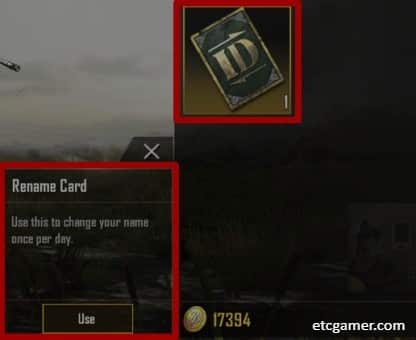
Here is a quick step-by-step guide:
- Open PUBG Mobile app.
- Tap on “Inventory” in the bottom menu.
- In the right side menu, tap on the “crate” icon at the bottom.
- You should see a rename card in the crate. Tap the Rename Card & Tap USE.
- Enter or Paste your new name and Tap OK.
Note: Choose carefully! You can only change your name once every 60 days. Also, ensure your name is unique; if it’s taken, try adding a few special characters or numbers to make it yours.
How to Get Free Rename Card
A rename card is your ticket to a fresh start in PUBG Mobile, but they don’t always come cheap.
While you can purchase one directly with UC (Unknown Currency), why spend real money if you don’t have to? There are several legitimate ways to score a card for free.

Here are the best methods to earn one:
- Complete Progress Missions: Jump into the game and head to the levels menu on the right. Focus on your progress missions. Once you smash through level 10, the game rewards you with a free rename card.
- The Crew Shop: Teamwork pays off. Go to the ‘Crew’ option on the main screen and visit the Crew Shop. If you have earned 200 crew points by playing matches with your crew, you can swap them for a rename card.
- Redemption Codes: Keep an eye on PUBG’s official social media channels. They occasionally drop redemption codes that you can enter at the redemption center for free loot, including rename cards. Act fast though—these codes often expire quickly!
Once you have secured your card, head back to your inventory, tap it, and enter your new name to confirm your new identity!
How to change clan name
Leading a squad? Sometimes a team needs a rebrand to signify a new era of dominance. Changing your clan name is straightforward.
- Visit the Clan Shop: First, you will need a Clan Rename Card. You can snag one from the clan shop for 300 clan points. (Hint: Earn points by crushing those daily clan challenges).
- Use the Card: Head to your inventory and look in the section below your emotes. Find that Clan Rename Card you just bought and tap “Use”.
- Create Your Brand: A pop-up will appear. Enter your new clan name here. This is the perfect time to use our generator to add cool fonts or symbols that make your team tag look intimidating in the lobby.
- Confirm: Tap “OK” to finalize the change.
Congratulations! Your clan now has a fresh identity. Go out there and make the name famous.
Note: Just like player names, clan names can only be changed once every 60 days. Make it count.
Conclusion
Think about the legends of the game—Shroud, ChocoTaco, Dynamo, Mortal. They aren’t just known for their insane aim, but for the iconic names they carry.
Your name is your brand. Whether you are a casual player or an aspiring pro, a unique handle helps you stand out from the crowd.
This generator works perfectly for PUBG New State as well, so you are covered across the battlegrounds.
Update:
While this tool is versatile enough for many games, we have built specialized tools to give you the best experience for specific titles.
For the soldiers out there, check out our COD Name Generator. If you are dropping onto the island in Free Fire, use our dedicated Free Fire Name Generator. And for the builders and battlers, we have the Fortnite Name Generator.
For all other games, our universal Game Name Generator has you covered. And if you just want to look cool on social media (Facebook, Twitter, etc.), try the Fancy Name Generator.
Active on Discord? Don’t forget to try our new Discord Name Generator to spice up your username or server channels.

Did the generated name give you trouble? Or maybe you just want to show off?
Comment your unique stylish name below! If it catches our eye, we might just highlight it in this post for everyone to see.ll highlight your name in this post if we like it 🙂






 PUBG
PUBG
501+ Best Nicknames for PUBG Mobile | 2026
 PUBG
PUBG
PUBG Symbols: a List of Stylish Symbols 😍🔥 (Copy/Paste)
 Tiktok
TikTok Name Generator | Powered by Smart AI
 Football
Fantasy Football Team Name Generator v3 ✨ | Powered by Smart AI
 Name Generators
Game Name Generator with Symbols ツ (Copy/Paste)
 Name Generators